
Training employees on digital tools means securing job-specific work actions and supporting practices on the factory floor. According to the Pix Observatory (2025), three in five employed people in France do not reach the level of professional digital autonomy, while more than 85% want to improve. These figures, which are not specific to industry, are a reminder of how important support is. Here is a five-step method, from diagnosis to evaluation, adapted to the constraints of workshops and production.
Train your operators more effectively: discover Picomto’s training solution to structure your digital instructions, guide hands-on practice at the workstation and make it easier to pass on know-how in the workshop.
How can you effectively train your teams on digital tools?
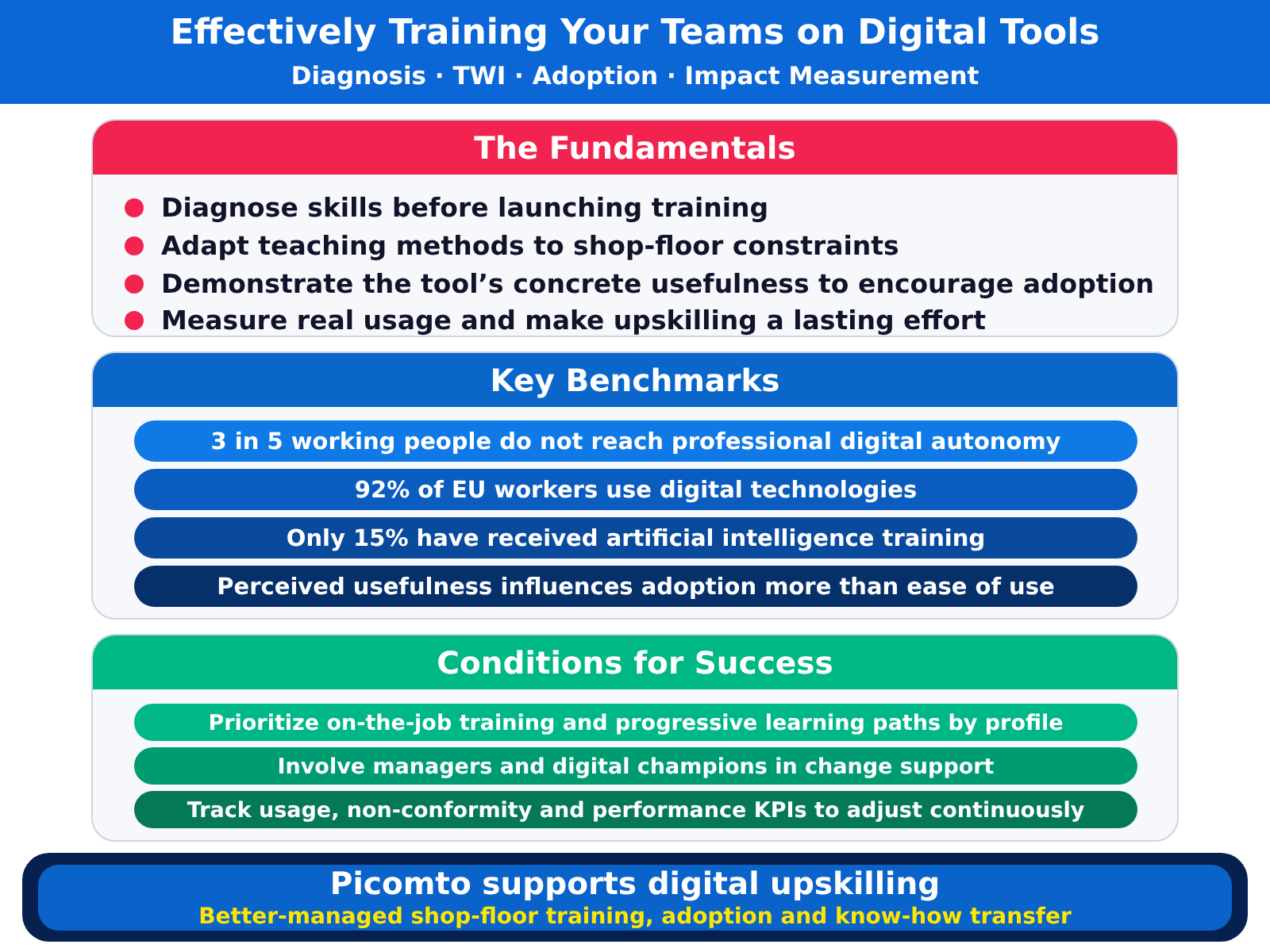
Training employees on digital tools requires a diagnosis of existing skills, teaching methods adapted to the shop-floor context, change support and ongoing evaluation of impact. The DigComp 3.0 framework (European Commission, 2025) provides a structuring framework for designing these learning paths by competence area.
Key data — Digital tools training in the workplace:
- 3 in 5 working people do not reach professional digital autonomy in France; only one blue-collar worker in four reaches this level in the survey. Source: Pix Observatory, 2025.
- 92% of EU workers use digital technologies at work, but only 15% have received AI training, according to figures cited by the European Commission when DigComp 3.0 was published. These are not industry-specific rates.
- r = 0.63 versus r = 0.45: in the first study of Davis’s TAM model (1989), perceived usefulness is more strongly correlated with self-reported current usage than ease of use is. This is not a causal measure.
Key points to remember about how to train employees on digital tools:
- Diagnose before training: identify actual needs by job role and avoid unnecessary modules.
- Adapt to the shop floor: have operators practice the actions and procedures they will actually use.
- Support the change: explain the benefit of the tool and provide hands-on, on-site support.
- Roll out in stages: test at one workstation, correct, then extend to other teams.
- Evaluate usage: measure applied skills, not just satisfaction.
- Refresh what has been learned: keep materials up to date and organize targeted refreshers.
- Make training continuous — Digital skills erode without regular practice; ongoing training is essential.
CEO & co-founder of Picomto — LinkedIn profile
Why train employees on digital tools? Because these tools change work actions, checks and instructions. In pharmaceuticals, aeronautics, energy or food processing, their adoption requires support. Digital transformation cannot be decreed.
1.1. What does digital transformation concretely change for shop-floor teams?
Paper operating procedures become digital work instructions; quality checklists are completed on tablets; maintenance interventions are tracked in a CMMS. These changes require knowing how to navigate the tool, recognize the right version of a procedure and report a deviation without improvising.
Teaching must respect the constraints of the workstation. In regulated sectors, operational compliance and traceability also impose specific requirements.
1.2. What are the real risks of poor adoption of digital tools?
When a solution is deployed without support, teams may make more data entry errors, use outdated documents or bypass the planned steps. Traceability can then be compromised, with consequences for quality, lead times and safety.
Ergonomics, access and the quality of procedures can also explain the difficulties. A diagnosis must therefore distinguish a skills problem from an organizational problem.
1.3. Why isn’t goodwill enough without a structured method?
More than 85% of working people want to improve their digital skills (Pix Observatory, 2025). Yet this motivation does not automatically translate into digital autonomy without a suitable educational framework. Digital autonomy — defined by Pix as the ability to adapt to new tools — is a measurable goal, not a natural state.
Before choosing a training method, you still need to know precisely what to train — and for whom.
2. Step 1 — How do you define and diagnose the digital skills to develop?
Assessing needs before training avoids a one-size-fits-all approach. The diagnosis must cover command of digital functions, but also the activities actually performed: consulting an instruction, entering a check, retrieving evidence or passing information on to the next team.
2.1. How do you map your teams’ current digital skills?
Combine self-assessment, observation at the workstation, an interview with the manager and a short scenario-based exercise. Pix assesses general skills.
Published on November 27, 2025, DigComp 3.0 is a cross-cutting framework: information and data, communication, content creation, safety and problem solving, with AI integrated across the different domains. It does not, however, replace a reference framework of work actions and procedures specific to each workshop.
2.2. How do you prioritize needs by job role and workstation?
An operator must follow the steps of a digital instruction and record their work. A maintenance technician may need to correctly log an intervention in a CMMS. A quality manager must review records and handle deviations. Prioritize critical situations and observed difficulties. AI figures do not determine a plant’s priorities.
| Profile | Priority digital skill | Expected proof of proficiency |
|---|---|---|
| Production operator | Follow a digital work instruction | Perform a task and record the planned steps |
| Maintenance technician | Use a procedure or a CMMS | Log a complete intervention |
| Quality manager | Use a digital checklist | Identify and document a deviation |
Sample matrix to adapt to the workstations and the company’s rules; these are not study results.
2.3. Which indicators should you use to set measurable training objectives?
Define SMART objectives: specific, measurable, achievable, relevant and time-bound. For example, aim for the autonomous completion of a validated sequence, with no critical step omitted, during an assessment at the workstation.
Record the initial level, the expected level, the validation criteria and the review date. Do not measure only the modules viewed. Once these expectations are clarified, the choice of teaching approach becomes more relevant.
3. Step 2 — Which methods should you adopt to train effectively on digital tools?
Learning must respect work schedules, access to devices and safety. The best format depends on the task, the associated risk and the possibility of practicing under controlled conditions.
| Format | Advantages | Limitations | Suitable profile |
|---|---|---|---|
| On-the-job training (TWI) | Contextualized learning, immediate application, direct observation | Requires an available trainer and a rigorous method | Operators and shop-floor staff |
| E-learning / microlearning | Flexible, can be consulted repeatedly | Insufficient on its own to validate certain technical actions | Support functions and refreshers |
| Blended learning | Combines theory, demonstration and practice | More demanding instructional coordination | Teams with mixed needs |
| Guided digital learning | Standardized visual aids, consultation at the workstation and possible follow-up | Requires reliable, up-to-date and accessible content | Operators, technicians and quality teams |
3.1. Why does on-the-job training remain the most effective method in industrial settings?
The TWI (Training Within Industry) Job Instruction method (Lean Enterprise Institute) organizes learning in four stages: prepare the person, present the job, have them try out the task, then follow up. This method helps transmit standardized work actions under safe conditions.
Picomto digital work instructions can serve as a visual aid and reference during this progression, subject to the conditions of use specific to the workstation.
3.2. Blended learning, e-learning, microlearning: how do you choose the right format?
Blended learning combines explanatory sequences with hands-on practice. E-learning makes it easier to distribute common knowledge and refreshers. Microlearning offers short modules whose length depends on the objective: three to five minutes may suit a targeted refresher, without constituting a universal instructional standard.
For a sensitive operation, only a practical check can confirm that the expected work actions are performed correctly.
3.3. How do you structure a progressive training path adapted to each profile?
A learning path can follow three phases: awareness of the objective, guided learning, then autonomous performance against validation criteria.
A new operator starts by identifying the applicable procedure; they observe the task, reproduce it, then are assessed. Plan refreshers after the first uses and make a contact person available.
4. Step 3 — How do you remove barriers and ensure the adoption of new digital tools?
Training is not enough if the organization still encourages old practices. Change management requires explaining the tool, listening to difficulties and adapting the organization.
4.1. What are the main forms of resistance to change when it comes to digital tools?
Frequently encountered barriers include fear of making a mistake, a feeling of being monitored, fear of losing hard-won expertise and lack of time. Some obstacles are individual; others stem from the organization: unstable connection, unavailable tablet or contradictory instructions.
Listening to operators before deployment helps distinguish between these situations. A usability difficulty calls for analysis.
4.2. Why is perceived usefulness the most powerful lever for promoting adoption?
Davis’s Technology Acceptance Model (1989) shows that perceived usefulness is more strongly associated with the self-reported current usage of a tool than its ease of use is (r = 0.63 versus 0.45 in the first study). The figures of 0.85 and 0.59 concern predicted future usage, not observed usage.
In practice, show the operator how a digital procedure can make it easier to find an instruction, report a deviation or verify a step. Ergonomics nonetheless remains decisive: a useful tool that is hard to access will be little used.
To explore the question of mobilizing teams around digital tools in greater depth, discover Picomto’s webinar on reducing human errors.
4.3. What role should the front-line manager play in providing support?
Davis’s Technology Acceptance Model (1989) shows that perceived usefulness is more strongly associated with the self-reported current usage of a tool than its ease of use is (r = 0.63 versus 0.45 in the first study). The figures of 0.85 and 0.59 concern predicted future usage, not observed usage.
In practice, show the operator how a digital procedure can make it easier to find an instruction, report a deviation or verify a step. Ergonomics nonetheless remains decisive: a useful tool that is hard to access will be little used.
5. Step 4 — How do you roll out training progressively in the workshops?
- A well-designed training program must still be tested under real plant conditions.
- Start with a representative pilot workstation or team.
- Check access to the tools, the legibility of the instructions and the completion of the planned tasks.
- Collect feedback, correct the content, then extend the program to other teams and shifts.
- Version-control the procedures and define who owns them. This progressive rollout limits gaps between the theoretical program and the practices actually adopted.

Example: testing a digital checklist on a packaging line. Success is not simply the login rate: you must verify that checks are performed correctly, that anomalies are reported and that operators know how to access the up-to-date instruction. This is an instructional example, not a client result.
Before rolling the program out more widely, check that night teams have access to materials equivalent to that of day teams. Identify a point person in each workshop, plan a fallback for when the system is unavailable and formalize the conditions for validating skills.
6. Step 5 — How do you measure the effectiveness of digital tools training and its ROI?
Measuring effectiveness requires going beyond the satisfaction questionnaire. You need to observe the skills acquired, their application at the workstation and the operational effects. Define a baseline and a target.
6.1. How do you apply the Kirkpatrick model to digital training?
The Kirkpatrick model distinguishes four complementary levels:
- Level 1 — Reaction: relevance, satisfaction and engagement as felt by participants.
- Level 2 — Learning: knowledge, skills, attitudes, confidence and commitment gained.
- Level 3 — Behavior: application of what was learned during professional tasks.
- Level 4 — Results: change in the targeted outcomes, where the link to the program can be substantiated.
Kirkpatrick Partners recommends starting from the expected results, then defining the behaviors and learning required. The model does not, on its own, calculate financial return.
6.2. Which operational indicators should you track to measure real impact?
The rate at which a procedure is consulted, tasks performed in accordance with the standard, the number of support calls, data entry errors or completion time can all be tracked.
Compare comparable periods and situations, taking into account changes in headcount, production or tooling. A decrease in non-conformities does not prove causality.
To estimate ROI, set the full costs of training and deployment against the economic gains reasonably attributable to the project; make your assumptions explicit and avoid universal promises of return.
The results are used to adjust modules and procedures.

6.3. How do you establish a continuous improvement approach for training?
A periodic review of indicators, operator feedback and updating of materials make it possible to adjust the program.
Assign a content owner for each critical procedure and a check after any change to a process or piece of equipment. Ongoing training thus becomes a skills management practice rather than an isolated event.
Conclusion
Training employees on digital tools is a structured process, not a one-off session. The five steps — diagnose, choose the teaching approach, support adoption, roll out progressively and measure impact — create a framework suited to industrial constraints. The challenge is to give operators reliable materials, time to practice and clear criteria for verifying their autonomy.
Do you want to digitalize your operating procedures and make it easier to train your shop-floor operators? Discover how Picomto supports the upskilling of industrial teams!
FAQ
How do you get trained in digital skills in an industrial setting?
Start by identifying the tasks that require a digital tool, then assess existing skills. Combine guided practice with validation at the workstation. Pix and DigComp can serve as benchmarks for general skills; job-specific procedures define the technical requirements specific to each workshop.
Which methods are effective for training teams on digital tools?
TWI Job Instruction, blended learning, e-learning and digital instructions meet different needs. For operators, demonstrations followed by observed exercises at the workstation are particularly relevant. Short modules suit refreshers but do not replace verification of critical tasks.
How do you involve employees in digital transformation?
Explain the concrete benefits, involve teams in choosing pilot situations and designate accessible go-to people. Collect comments on procedures, allow time for learning and quickly fix equipment-related or organizational problems.
Which approaches support digital upskilling?
Companies can combine in-person training, mentoring, e-learning, microlearning, hybrid paths and digital work instructions. The right approach depends on the job, the starting level, how critical the work actions are and access to equipment.
What benefits can be expected for the company and its employees?
Structured training can improve command of procedures, the quality of records and autonomy at the workstation. It can also help reduce certain errors and strengthen team confidence. These benefits must be verified using indicators defined before deployment, without automatically attributing every gain to the training.
Key points to remember:
- Diagnose: target the skills useful for each workstation.
- Have people practice: link learning to real work actions and instructions.
- Support: address human and organizational barriers.
- Test: validate usage before wider rollout.
- Measure: track observable behaviors and results.
- Update: keep content and learning up to date over time.











Leave A Comment